maven
assist.

because life is too short for xml.

A JetBrains plugin that deals with your pom.xml so you don’t have to. Write one, manage the dependencies from a single panel, keep the versions current, all without opening the file once.

Six things it does, none of them xml

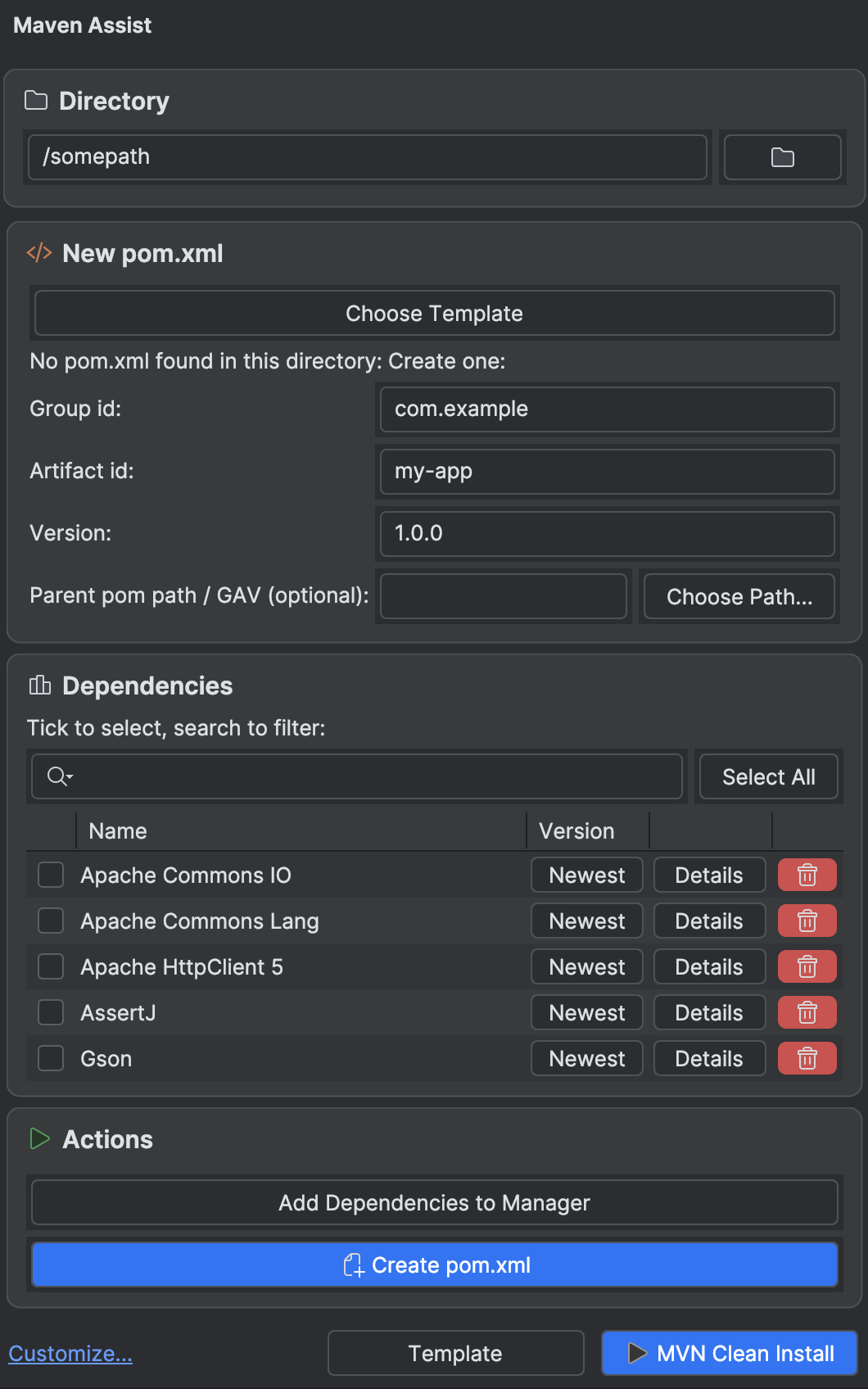
The Maven Assist tool window in create mode: a directory field, a New pom.xml form with group id, artifact id and version, and a tickable dependency list.

Create poms

  • Point the tool window at any directory. If there is no pom.xml in there yet, the plugin switches to create mode and hands you a form instead of an empty file.
  • Fill in the group id, artifact id and version, add a parent pom if you use one, or skip all of that and pick a template instead.
  • Then tick the dependencies you want. Search narrows the list down, Select All grabs whatever the search found, and Details on a row shows you its coordinates and newest version.
  • Hit Create pom.xml and you land straight in the dependency table. If you liked the setup, save it as a template and start the next project from it.

Install it

There is no account to make and nothing to configure. It is on the Marketplace, and a minute later it is in your IDE.

Open the listing
  1. 01Open Settings → Plugins → Marketplace.
  2. 02Search for Maven Assist.
  3. 03Install it, and restart the IDE if it asks you to.
  4. 04Look for it in the tool window sidebar. That is the whole setup.

What’s new

2.0.0latest

Major changes in how the plugin acts & security improvements

2.0.0 is mostly about the plugin not doing things behind your back. Automatic updates can run when you save, when you open a project, before mvn clean install, or on a shortcut you pick, and every one of them asks before it touches a dependency. Turning auto update on or off for a dependency asks first as well. With "Update All" you can wave everything through at once, or go down the list and choose.

Reading and writing poms got a lot more careful. Dependencies that differ only by type or classifier are told apart properly now, and a version property shared between several dependencies no longer gets clobbered.

Templates can be saved straight from the form, or from the pom you already have. There is a new Template menu at the bottom of the window for saving the current pom.xml as a template, exporting it as xml, and importing an existing pom as one. The template picker moved up to sit right under the creation heading.

The rest is security and tidying up. Automatic actions respect IntelliJ Safe Mode, saved project data no longer carries absolute paths from your machine, and the plugin still only goes online when a feature actually needs it. Optional Maven downloads are checked against a pinned SHA-512 checksum and come with size limits, timeouts and temporary files that clean themselves up. The whole interface follows your active IntelliJ theme, custom ones included. On top of that there are a lot of fixes around concurrent updates, builds, notifications and pom edits.

  1. 1.0.1Just some small tweaks

    Changing some texts and descriptions.

More information

Requirements

  • IntelliJ IDEA, or any compatible JetBrains IDE, 2025.1 or newer.
  • Maven: either the project’s mvnw wrapper, a PATH install, the bundled one, or let the plugin install it for you.

Open source under the MIT licence.

Privacy

  • It only reaches the internet when you ask it to: Maven Central to look up versions, and the Apache CDN if you let it download Maven for you.
  • Everything else stays on your machine.
0telemetry
0analytics
0accounts

Found a bug? Missing something?

Tell me about it. The plugin got most of its features that way.

Let’s Talk

Made with love by zukotuutori